PC Workmate™
Bridge the gap between mainframe report data and the PC users who need it with PC Workmate. PC Workmate moves reports, data, and files between the VSE/POWER queue and desktop PCs.


PC Workmate distributes your report data to users electronically, automatically, efficiently, and flawlessly. As fast as your report data is written to the POWER queue, PC Workmate can extract it and automatically deliver it to any number of people.
From a central file server, PC Workmate sends VSE/POWER entries anywhere on your LAN. It can deliver POWER reports by email. It can format reports for Web browsers. It can automatically manage multiple generations of the same report.
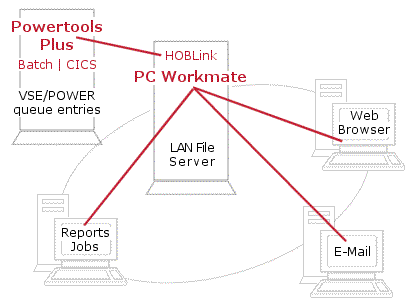
Report data is just the tip of the iceberg with PC Workmate. File transfer, report mining, report printing, CICS interface, automatic, bidirectional data transfer, and even event-driven processes are made possible with PC Workmate.
Text and binary file transfers to VSE/POWER from the PC do not require traditional IND$FILE or host transfer file protocols–PC Workmate provides transfers directly into your VSE/POWER queue or CICS temporary storage. PC Workmate’s exclusive Hot Reader makes drag-and-drop file transfers a reality.
That’s why PC Workmate gives you the ability to run any application you like after successful reception of a report or file.
Using PC Workmate’s report mining features, you can select only the report data pages you need. Simply tell PC Workmate what to look for and it will, despite the size of the input report, transfer only the data that you need.
You’ll never be the last job in the print spool with PC Workmate; simply transfer the data you need to your desktop and then print it, automatically if desired, on the PC printer of your choice.
No problem with PC Workmate. Send the data up and PC Workmate will place it into a TS Queue and start the CICS transaction of your choice.
The automatic transfer features of PC Workmate are nothing short of magic! You define a subdirectory (or hot reader) on your PC and PC Workmate will constantly monitor it on your behalf; when a file is written to it, it’s automatically transferred to the host, without operator intervention. The same principles apply to the host. You define certain classes, user-IDs, etc. to be monitored in the POWER Queue and when a report or data file matching the criteria exists, it’s automatically transferred to your PC.
Bidirectional, automatic transfers open the doors to event-driven processes. You can actually create JCL job streams, dynamically, on the PC and then send them up to the host as batch jobs that run immediately or as CICS data to be processed via the transaction of your choice.
PC Workmate on a file server or a desktop communicates with VSE/POWER via two proven technologies:
Both are included as a part of the PC Workmate distribution.
We offer individualized product demonstrations by request. Your organization can also try SDS Software on your system for 30 days, free of charge.

Phone: (800) 443-6183
Phone: (763) 571-9000
200 Village Center Drive, Suite 250
North Oaks, MN 55127
USA