
PGP® Command Line for IBM Mainframes: Advantages
PGP is tried and trusted: PGP encryption has undergone more than a decade of intense review by the world's best cryptographers. PGP Command Line relies on an open standard, OpenPGP (see IETF RFC 2440), and PGP Corporation has released source code for peer review and validation.
Strong Encryption!
The strong cryptography employed by
PGP Online is the best available.
Scripted Encryption, in Transit and at Rest: Encrypted data is safe, whether moving cross-country or resting in the datacenter. PGP Command Line installs on an existing server where information is batch-processed. Data-transfer scripts--using REXX, JCL, or other languages--call on PGP Command Line for encryption before transmitting messges. Backup scripts call on PGP Command Line before writing to archives.
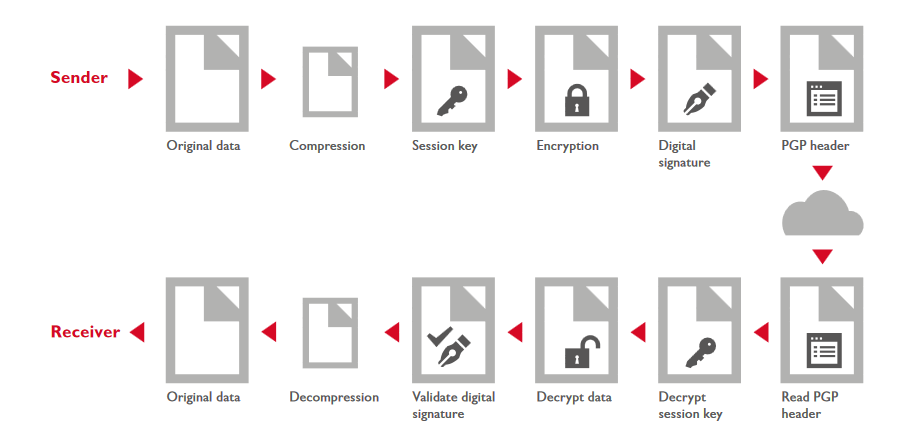
Security and Compression: PGP encryption starts with compression to decrease the size of files. Compressed files are not only easier to encrypt, transport, and store, they are harder to decrypt without the right tools and keys. Binary files typically compress to half their original size. Flat files compress as much as 90%.
Authenticity, Integrity, Non-repudiation: PGP Command Line encryption includes hash and signature mechanisms to ensure that data came from the expected source and that data is complete and untampered with. In addition, the source cannot deny having sent the data.
Retention, Archives, and Recovery: PGP Additional Decryption Key technology (ADK) ensures that encrypted archives can be made available when the time comes--a requirement of many regulations, organizations, and business partners--as a safeguard against lost keys.
Send Encypted Data to Any Business Partner: If your partners don't have encryption software or public keys, send them a PGP Self-Decrypting Archive (SDA), and send the decryption key by some other, secure route. The SDA is executable on any of the same Linux, Unix, Windows, Mac OSX, and z/OS platforms where PGP Command Line can run.
Erase Files, not Just File Addresses: PGP Command Line provides Secure File Deletion that permanently overwrites data files, making them impossible to retrieve by any means.
Key Splitting, the Ultimate Protection: Make decryption impossible to perform in secret. PGP Command Line can split private keys into multiple pieces, held by multiple people. Decryption requires that all the people agree and all the pieces come together.
Key Management: PGP Command Line...
- Generates public-private key pairs.
- Stores keys in PDSs protected by SAF security: RACF, ACF2, or TopSecret
- Searches out keys and certificates at servers, both OpenPGP and X.509.
- PGP Command LIne 10 will provide key server support for symmetric keys.
Key Service: PGP Command Line readily collaborates with a PGP Universal Server to provide...
- Signed certificates to authenticate public keys.
- Secure backup of private keys behind user-specified security questions.
- Records of revoked keys and certificates.
Public Key Directories: Find user's public keys when you need them. The PGP Universal Server provides a PGP Global Directory for OpenPGP keys. And it provides LDAP v3 directories for X.509 certificates.
Key Reconstruction: Normally, users keep their private keys on their private machines, protected by pass-phrases. For backup, they can also store keys on a PGP Universal Server, protected by fragmentation, encryption, and a sets of security questions written by the users. In a pinch, then, users can retrieve their keys from the server by correctly answering the questions.
Certificates Authenticate Public Keys: Signed certificates verify to your data sources that your public key is indeed yours. That prevents an imposter from substituting a counterfit key, fooling your sources into supplying private data to the wrong people--the so-called "man-in-the-middle attack."